Stack Overview
The following ROS2 packages make up the Staubli Driver ROS2 stack:
staubli_driver_ros2: Meta-package containing the documentation.
staubli_robot_driver: The main package, containing the Hardware Interface and the VAL3 code that runs on the robot controller.
staubli_robot_description: URDF and XACRO files for Staubli robots.
staubli_moveit_config: MoveIt2 configuration package for Staubli robots.
staubli_bringup: Launch files to start the driver and related nodes.
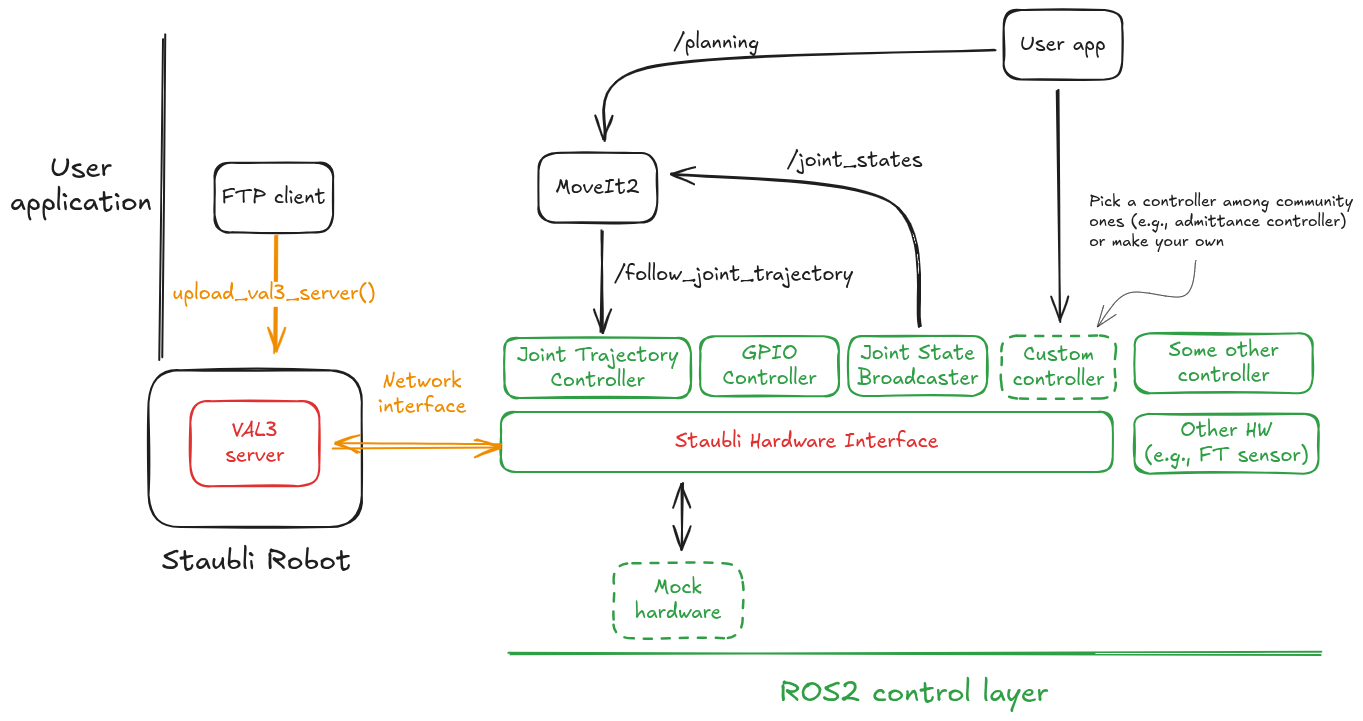
Fig. 1 The Staubli Driver ROS2 stack provides a VAL3 robot-side server and an ROS2 client in the form of a Hardware Interface.
Staubli Hardware Interface
State interfaces
Joint state interfaces follow the form <robot_prefix><joint_name>/<interface_name>.
The following joint state interfaces are provided:
positionvelocityeffort(estimated from current; not directly measured).
Supervision state interfaces use the form <robot_prefix>supervision/state.
The following supervision states are provided:
operation_mode: integer code representing the current operation mode of the robot (manual, automatic, etc.).operation_mode_status: integer code representing the current status. Meaning varies depending onoperation_mode; see the VAL3 documentation for details.safety_status: integer code representing the current safety status (E-stop, SS1, SS2, etc.).control_sequence_delay: the total delay in the control loop (ping-pong), expressed in number of cycles.brakes_released: boolean indicating whether the robot brakes are released (i.e., power ON).motion_possible: boolean indicating whether motion is currently possible (no E-stop, no safety violation, brakes released, etc.).in_motion: boolean indicating whether the robot is currently moving.in_error: boolean indicating whether the robot is in an error state.estop_pressed: boolean indicating whether the emergency stop is currently pressed (see alsosafety_status).wait_for_ack: boolean indicating whether the robot is currently waiting for an acknowledgment from the operator (i.e., Safety Restart).
GPIO state interfaces use the form <robot_prefix>gpio/<gpio_name>.
The following GPIO states are provided:
digital_input_i: whereiis the input number (up to 16).analog_input_i: whereiis the input number (up to 4).
Control interfaces
Joint control interfaces follow the form <robot_prefix><joint_name>/<interface_name>.
The following joint control interfaces are provided:
positionvelocity(not implemented yet).
GPIO control interfaces use the form <robot_prefix>gpio/<gpio_name>.
The following GPIO controls are provided:
digital_output_i: whereiis the output number (up to 16).analog_output_i: whereiis the output number (up to 4).
Parameters
The driver can be configured using parameters passed through the XACRO macro (see staubli_robot_description/r2c/staubli.r2c.xacro).
The following parameters can be set for each robot instance:
robot_ip(string): IP address of the robot controller.robot_prefix(string): Prefix to add to all link, joints, and interfaces of this robot.num_digital_inputs(int, default: 16): Number of digital inputs available on the robot.num_digital_outputs(int, default: 16): Number of digital outputs available on the robot.num_analog_inputs(int, default: 2): Number of analog inputs available on the robot.num_analog_outputs(int, default: 2): Number of analog outputs available on the robot.
Additionally, the following parameters can be set to configure the communication ports:
control_port(int, default: 11000): Port number for the robot control interface (robot side).diagnostic_port(int, default: 11001): Port number for the robot diagnostic interface (robot side).local_control_port(int, default: 11000): Port number for the local control interface (ROS2-side).local_diagnostic_port(int, default: 11001): Port number for the local diagnostic interface (ROS2-side).
FTP utility scripts
The package provides utility scripts to facilitate file transfers to and from the robot controller using FTP.
These scripts can be found in the staubli_driver_ros2/scripts directory.
Currently, the following scripts are available:
upload_val3_server.py: Uploads the VAL3 server program to the robot controller.remove_val3_server.py: Removes the VAL3 server program from the robot controller.download_logs.py: Downloads log files from the robot controller.show_logs.py: Displays log files from the robot controller in the console.